Showing posts with label certificate. Show all posts

Sunday, February 27, 2011

If you run firefox– install https everywhere now

I'll do a post later about session hijacking, firesheep and the evils of non https based websites. In the meantime, if you use firefox be sure to the run the https everywhere extension.  Without https everywhere I would be concerned about accessing my accounts on a public wifi network.  HTTPS Everywhere forces the browser to use https when accessing any website that supports both http and https.

(By the way If you have a security question, or question on any of the topics I cover on my blog leave a comment and I’ll be happy to do a post answering your questions)

Friday, October 15, 2010

Facebook, OpenID and Decrypting SSL

I was excited to see Facebook (FB) supporting login via OpenID (FB is a relying party), and I decided to give it a whirl. Here I list the results of my investigation, which describe the odd use of OpenID, as well as my wire level analysis which I hope you find informative. This post doesn't go into details of how OpenID works, if you're interested in that leave a comment and I'll put up such a post.

FB uses OpenID in a way I've never seen before. In the "common" OpenID login model, you get a login page that shows you some sort of login via OpenID buttons. When you go to the FB login page there is no login via OpenID.   This confused me, but I went to my FB account settings and linked my google account to my FB account. (Attempts to link my MyOpenID account failed with a strange error message). 

After some trial and error I realized that if I was logged into my Google account and went to the FB page than I'd automatically get logged into FB.

Debugging SSL via Charles

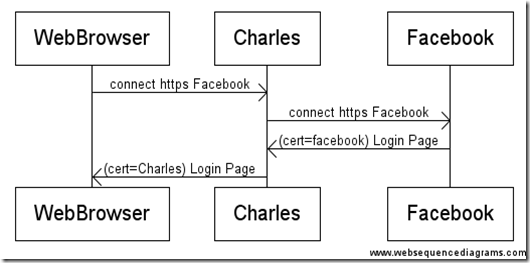
I needed to look at the network layer to see what is going on. Some of you may want to investigate this with tshark, but much of the traffic runs over SSL, since we don't have the server certs that's a dead end.  Instead you should fire up Charles, an http(s) debugging proxy.  Charles can sit in the middle of your SSL connections, and relay SSL traffic by presenting ‘untrusted certs’. Visually it looks like this:
 

image


How Facebook OpenID login works at a high level:

  1. Facebook login page contains javascript that tells your browser to login to Yahoo and Google via OpenID
  2. Your browser tries to connect to Yahoo and Google OpenID Endpoints, which post results back to FB
  3. If the login via OpenID succeeds, and you have a linked account you get logged into FB.
  4. If the request fails or there is no linked account you see nothing.

The Facebook OpenID approach:

If you’re logged into your Google account, and then go to the FB page, you’ll be automatically logged into FB, otherwise nothing happens. This is by design as mentioned here.

This is an interesting implementation of login via OpenID. It has the following advantages:

  • It’s immune to phishing
  • It requires no UI when you’re logged into your OpenID provider

At the same time there are some big disadvantages:

  • There is a privacy leak as all OpenID providers supported by FB now know you’re trying to access FB and at what frequency and from what client
  • FB needs to connect to every OpenID provider that exists on login.
  • FB doesn’t allow you to specify which account you want to use to login if you have multiple.
  • You can’t link your FB account to OpenID by logging into OpenID
  • It’s hard to discover login is failing because you aren’t signed into an OpenID account.

I look forward to seeing how FB moves this forward.

How Facebook OpenID login works at a protocol level:

This is probably too geeky for most but I find it interesting so I’ll share it. Comment if you’d like to see more of this sort of analysis.

The first column is the return code 200 is success, 302 is a redirect. Second column is the DNS name, and third column is truncated request.

1) Facebook login page contains javascript that tells your browser to login to Yahoo and Google via OpenID

// Connect to FB
200    GET    www.facebook.com   

// JavaScript connects to FB Analytics system telling them what we're trying.
200    GET    pixel.facebook.com    /ajax/openid/metrics.php?metric=requestSent&immediate=true&context=background_login&openid_url=http%3A%2F%2Fyahoo.com%2F&asyncSignal=779    
200    GET    pixel.facebook.com    /ajax/openid/metrics.php?metric=requestSent&immediate=true&context=background_login&openid_url=http%3A%2F%2Fgmail.com&asyncSignal=9380    

// 2) Javascript tries to connect to Yahoo and Google OpenID Endpoints, which post results to: www.facebook.com/openeid/receiver

// 2.1) HTTPS connection to Google OpenID
302    GET    www.google.com    /accounts/o8/ud?openid.claimed_id=…

// 2.2) HTTPS connection to Yahoo OpenID
302    GET    open.login.yahooapis.com    /openid/op/auth?openid.claimed_id=…

// 2.3) Yahoo OpenID telling FB it failed.
302    GET    www.facebook.com    /openid/receiver.php?provider_id=1923581983856&openid.mode=setup_needed&…

// 2.4) Google OpenID telling FB it succeeded.
302    GET    www.facebook.com    /openid/receiver.php?provider_id=1010459756371&…openid.sig=…

// FB telling itself the Yahoo login failed (this gives FB the chance to add new paramters server side, which it does)
200    GET    www.facebook.com    /openid/receiver.php?provider_id=1923581983856&…

// FB recording stats that the yahoo login failed.
200    GET    pixel.facebook.com    /ajax/openid/metrics.php?metric=requestCanceled&immediate=true&context=background_login&openid_url=http%3A%2F%2Fyahoo.com…

// FB telling itself the Google Login Succeeded (this gives FB the chance to add new paramters server side, which it does)
200    GET    www.facebook.com    /openid/receiver.php?provider_id=1010459756371 …

// 3. If the login via OpenID succeeds, and you have a linked account you get logged into FB. (FB Logging in)
302    POST    www.facebook.com    /login.php    
200    GET    www.facebook.com    /     

The actual request if you’re feeling really geeky:

// More Details 2.1) HTTPS connection to Google OpenID

openid.claimed_id    http://specs.openid.net/auth/2.0/identifier_select
openid.ext0.mode    fetch_request
openid.ext0.required    email,first_name,last_name,country,language,dob
openid.ext0.type.country    http://axschema.org/contact/country/home
openid.ext0.type.dob    http://axschema.org/birthDate
openid.ext0.type.email    http://axschema.org/contact/email
openid.ext0.type.first_name    http://axschema.org/namePerson/first
openid.ext0.type.language    http://axschema.org/pref/language
openid.ext0.type.last_name    http://axschema.org/namePerson/last
openid.identity    http://specs.openid.net/auth/2.0/identifier_select
openid.mode    checkid_immediate
openid.ns    http://specs.openid.net/auth/2.0
openid.ns.ext0    http://openid.net/srv/ax/1.0
openid.ns.oauth    http://specs.openid.net/extensions/oauth/1.0
openid.ns.ui    http://specs.openid.net/extensions/ui/1.0
openid.oauth.consumer    www.facebook.com
openid.oauth.scope    http://www.google.com/m8/feeds/contacts/
openid.realm    https://www.facebook.com/
openid.return_to    https://www.facebook.com/openid/receiver.php?provider_id=1010459756371&protocol=http&context=background_login&request_id=1
openid.ui.icon    true
openid.ui.mode    popup

// More Details 2.4) Google OpenID telling FB it succeeded.
provider_id    1010459756371
protocol    http
context    background_login
request_id    1
openid.ns    http://specs.openid.net/auth/2.0
openid.mode    id_res
openid.op_endpoint    https://www.google.com/accounts/o8/ud
openid.response_nonce    2010-10-14T06:07:08ZPY_ztwISRBSIzA
openid.return_to    https://www.facebook.com/openid/receiver.php?provider_id=1010459756371&protocol=http&context=background_login&request_id=1
openid.assoc_handle    ...
openid.signed    op_endpoint,claimed_id,identity,return_to,response_nonce,assoc_handle,ns.ext1,ns.ext2,ext1.mode,ext1.type.first_name,ext1.value.first_name,ext1.type.email,ext1.value.email,ext1.type.language,ext1.value.language,ext1.type.last_name,ext1.value.last_name,ext2.scope,ext2.request_token
openid.sig    oCFFt53s1j4rD7kGOE8x1ycZMfU=
openid.identity    https://www.google.com/accounts/o8/id?id=...
openid.claimed_id    https://www.google.com/accounts/o8/id?id=...
openid.ns.ext1    http://openid.net/srv/ax/1.0
openid.ext1.mode    fetch_response
openid.ext1.type.first_name    http://axschema.org/namePerson/first
openid.ext1.value.first_name    Igor
openid.ext1.type.email    http://axschema.org/contact/email
openid.ext1.value.email    ...
openid.ext1.type.language    http://axschema.org/pref/language
openid.ext1.value.language    en
openid.ext1.type.last_name    http://axschema.org/namePerson/last
openid.ext1.value.last_name    ...
openid.ns.ext2    http://specs.openid.net/extensions/oauth/1.0
openid.ext2.scope    http://www.google.com/m8/feeds/contacts/
openid.ext2.request_token    4/bv0-X57lya6ESvrvYG3pQiAGuSzn
openid.ns.ext3    http://specs.openid.net/extensions/ui/1.0
openid.ext3.mode    popup

Saturday, February 27, 2010

How to determine the server certificate given an https wcf proxy?

One day when you are using https transports in WCF you might try to figure out what certificate the server is using. That is going to be the day you're glad you found my blog.
 
namespace WebClient
{
using System;
using System.IdentityModel.Tokens;
using System.ServiceModel;
using System.ServiceModel.Channels;

///
/// Interface implemented by a random https bound web service I found on the web.
///

[ServiceContract (Namespace="http://arcweb.esri.com/v2")]
interface IVersion
{
[OperationContract]
string getVersion();
}

class Program
{
static void Main(string[] args)
{
var httpsBinding = new BasicHttpBinding(BasicHttpSecurityMode.Transport);
var endpointAddress = new EndpointAddress("https://arcweb.esri.com/services/v2/AccountInfo");
var serviceClient = new ChannelFactory<IVersion>(httpsBinding, endpointAddress).CreateChannel();

// Instantiating an OperationContextScope populates the OperationContext.Current property
using (OperationContextScope scope = new OperationContextScope(serviceClient as IContextChannel))
{
serviceClient.getVersion();
// Certificate not available until after an API call.
var myCertificate = (OperationContext.Current.IncomingMessageProperties.Security.TransportToken.SecurityToken as X509SecurityToken).Certificate;
Console.WriteLine(myCertificate);
}
}
}
}


I expect most folks will skip this post, but if you end up needing this tip leave a comment with what you’re up to -  I’m curious!

Saturday, February 6, 2010

Better Certificate Management in Powershell via CertificateHelper

If you’ve read my previous post here, you know powershell can do some basic certificate management via the certificate provider. However, the certificate provider has some limitations. The certificate provider can’t create,delete,copy or import/export certificates.

This annoyed me so I’m creating a powershell module called CertificateHelper that will provide these missing features.

So far the module implements:

  • New-Certificate
  • Remove-Certificate 

CertHelper can be found on codeplex.

You install it like this:

(You must have hg installed)
PS C:\>cd $home\Documents\WindowsPowerShell\Modules
PS C:\Users\igord\Documents\WindowsPowerShell\Modules> hg clone https://hg01.codeplex.com/certificatehelper
destination directory: certificatehelper
requesting all changes
adding changesets
adding manifests
adding file changes
added 5 changesets with 8 changes to 4 files
updating to branch default
4 files updated, 0 files merged, 0 files removed, 0 files unresolved


Once installed, you can make it available in your powershell session like this:


PS C:\> Import-Module CertificateHelper


You can see the implemented commands like this:


PS C:\> dir function:\*-Certificate

CommandType Name Definition
----------- ---- ----------
Function New-Certificate param([parameter(Mandatory=$true)]...
Function Remove-Certificate param($certificatePath)...


A walk through of using the module is:


PS C:\> dir cert:\LocalMachine\My | ? {$_.Subject -like "*Dog*"}
PS C:\> New-Certificate cert:\LocalMachine\My DogFood
Succeeded
PS C:\> dir cert:\LocalMachine\My | ? {$_.Subject -like "*Dog*"}


Directory: Microsoft.PowerShell.Security\Certificate::LocalMachine\My


Thumbprint Subject
---------- -------
A229E9FF2AA9DC55D06A35D0BBB0D0A98FEAC1A3 CN=DogFood


PS C:\> Remove-Certificate cert:\LocalMachine\My\A229E9FF2AA9DC55D06A35D0BBB0D0A98FEAC1A3
PS C:\> dir cert:\LocalMachine\My | ? {$_.Subject -like "*Dog*"}
PS C:\>


This is a work in progress, so holler if you hit any issues, or want to prioritize the order in which I provide the features.

Thursday, January 14, 2010

How do you thumbprint a certificate?

You often use thumbprints to find certificates, but what is the thumbprint?  The thumbprint is the hash of the certificate. In the case of the CLR’s X509Certificate2 class, the thumbprint is the SHA1 hash of the certificate. If you want to compute the thumbprint of a certificate yourself it’s pretty simple:

 
function get-CertThumbprint ($cert)
{
$sha = new-object System.Security.Cryptography.SHA1CNG
$hashOfRawBytesOfCertificate = $sha.ComputeHash($cert.RawData)
( $hashOfRawBytesOfCertificate| % {"{0:X}" -f $_} ) -join ""
}


PS cert:\LocaLMachine\My> dir


Directory: Microsoft.PowerShell.Security\Certificate::LocaLMachine\My


Thumbprint Subject
---------- -------
3BCA8A25A071300BD177E4C73135E54FA830039A CN=STS
08766D8B3DCDE5D633ED06AB1CB4DF4CCAECA533 CN=localhost

PS cert:\LocalMachine\My> $cert = get-item 08766D8B3DCDE5D633ED06AB1CB4DF4CCAECA533
PS cert:\LocalMachine\My> $cert.Thumbprint
08766D8B3DCDE5D633ED06AB1CB4DF4CCAECA533
PS cert:\LocalMachine\My> get-CertThumbprint $cert
8766D8B3DCDE5D633ED6AB1CB4DF4CCAECA533


If you’re wondering why you don’t use the subject name to identify a certificate, it’s because you can have lots of certificates with the same subject name.

Friday, October 23, 2009

Do your certificate management in Powershell

I do a lot of security work, and that means lots of time poking at certificates. Tooling for certificates was never something I was happy with until I stumbled upon powershell. Let me give you a demo:

PS C:\> cd cert:

PS cert:\> cd .\LocalMachine\My
PS cert:\LocalMachine\My> dir

Directory: Microsoft.PowerShell.Security\Certificate::LocalMachine\My


Thumbprint Subject
---------- -------
4EE3FDE4FFF422935CAA0CA2783EF2CA601D6DE5 CN=NonSecretGlobalEncryptKey
272BDAC53C26CC5A8067FE6076D2F74797F69AF7 CN=igordm1, OU=Workstations, OU=Machines, DC=redmond, DC=corp, DC=microsof...


PS cert:\LocalMachine\My> cd\
PS cert:> cd .\CurrentUser\Root
PS cert:\CurrentUser\Root> dir | where {$_.Subject -like "*Veri*"}


Directory: Microsoft.PowerShell.Security\Certificate::CurrentUser\Root


Thumbprint Subject
---------- -------
18F7C1FCC3090203FD5BAA2F861A754976C8DD25 OU="NO LIABILITY ACCEPTED, (c)97 VeriSign, Inc.", OU=VeriSign Time Stampin...
85371CA6E550143DCE2803471BDE3A09E8F8770F OU=VeriSign Trust Network, OU="(c) 1998 VeriSign, Inc. - For authorized us...
742C3192E607E424EB4549542BE1BBC53E6174E2 OU=Class 3 Public Primary Certification Authority, O="VeriSign, Inc.", C=US
4F65566336DB6598581D584A596C87934D5F2AB4 OU=Class 3 Public Primary Certification Authority, O="VeriSign, Inc.", C=US
4EB6D578499B1CCF5F581EAD56BE3D9B6744A5E5 CN=VeriSign Class 3 Public Primary Certification Authority - G5, OU="(c) 2...
24A40A1F573643A67F0A4B0749F6A22BF28ABB6B OU=VeriSign Commercial Software Publishers CA, O="VeriSign, Inc.", L=Internet


PS cert:\CurrentUser\Root> $cert = gi 24A40A1F573643A67F0A4B0749F6A22BF28ABB6B

PS cert:\CurrentUser\Root> $cert.ToString()
[Subject]
OU=VeriSign Commercial Software Publishers CA, O="VeriSign, Inc.", L=Internet

[Issuer]
OU=VeriSign Commercial Software Publishers CA, O="VeriSign, Inc.", L=Internet

[Serial Number]
03C78F37DB9228DF3CBB1AAD82FA6710

[Not Before]
4/8/1996 5:00:00 PM

[Not After]
1/7/2004 3:59:59 PM

[Thumbprint]
24A40A1F573643A67F0A4B0749F6A22BF28ABB6B

PS cert:\CurrentUser\Root>
Does the output of $cert.ToString() look familiar? It's actually the ToString() on X509Certificate2. This means as well as having a great certificate store browser, you also get to access the CLR certificate classes interactively - Yeehaw!